
The rule
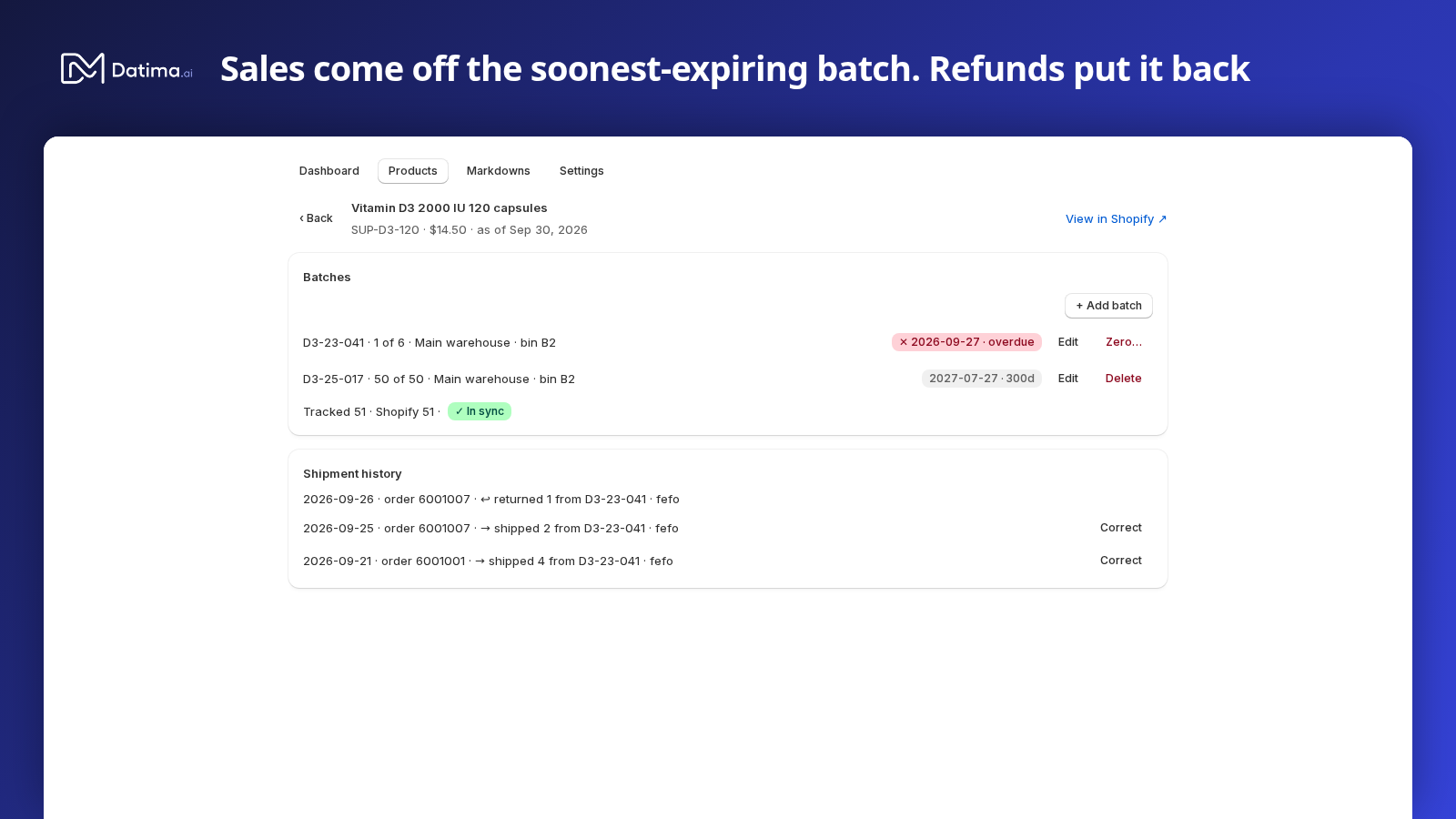
From the moment a product has a batch, Datima watches your orders. When an order ships, the units come off the batch that expires first. If that batch runs out, the next one is used. This is first-expired-first-out — FEFO — and nobody has to touch the app for it to happen. Nothing happens when the order is placed, only when it is fulfilled; a cancelled order never touches a batch.
In a store with several locations, the batch is taken at the location that fulfilled the order, and a batch is never taken from a different location than the one that shipped (locations).
Refunds
A refund puts the units back on the exact batch they came from — not on whichever batch is oldest now. The record is append-only: the shipment stays, and a return line points at it, so the history of every unit is a query, not a guess.
Unmatched sales
When more units ship than your batches cover — sales from before you recorded the batch, or a delivery you have not entered — Datima does not invent a batch. It shows the gap: ⚠ 6 sold units unmatched to any batch on the dashboard, ⚠ unmatched sales on the product's row, and on the product's page: These sales happened before their batches were recorded. Add the missing batch, then use “Correct” on the unmatched shipment below.
So the dashboard is honest by construction. A product with unmatched sales is a prompt to record stock, never a silently wrong number.
The shipment history
The product's page lists every movement under its batches: → shipped 2 from A3155 · order 1042, ↩ returned 1 from A3155, or no batch (unmatched) when nothing covered it. Show all opens the full list.
Correct a shipment
Sometimes the picker took a different batch than the earliest one — from overflow, not the pick face — or a shipment was unmatched because the batch was entered late. Press Correct on the shipment. The dialog explains what happened (2 units were attributed by earliest-expiry guess, or attributed to no batch at all) and lists only the batches that could plausibly have been picked: received on or before the sale, with stock remaining. Choose the actual batch, add a reason if you like, and press Correct. Both records are kept: the guess and the correction.
When Datima and Shopify disagree
Each product's page compares the two counts — Tracked 42 · Shopify 44 · ⚠ 2 units unaccounted for — and What? opens the three reasons they can differ, each with its fix:
- Stock received without a batch. Shopify knows about units this app has no expiry date for. Fix: add a batch for the new delivery.
- Shrinkage or manual adjustments. Stock corrected, damaged or removed in Shopify without a matching batch change. Fix: edit the batch quantities to match reality.
- Units sold that no batch covered. Sales are matched to batches earliest-expiry-first; if batches were under-recorded, the difference shows here. Fix: record the missing batch, then resolve the unmatched sales.
The dashboard sums the same comparison as ⚠ N items out of sync with Shopify. ✓ In sync means your batches add up to Shopify's count exactly.
What the rest of your store sees
Each variant carries its earliest expiry date as a metafield, expiry.earliest_expiry, kept current as batches are added, sold and zeroed. Your theme shows it through the Best before block; Shopify Flow or another app can read it too.
Related guides
- Batches: record an expiry date, a quantity and where it sits
- Batches across several locations
- The dashboard: what expires, when, and what it is worth
- Getting started: the five-minute path
Questions? support@datima.ai · Last updated 14 October 2026