
Blog
Automatic markdowns for short-dated stock: discount the batch, not the product
1 October 2026 · Datima.ai
Every store with dates on its stock has the same ritual. Someone walks the shelf, finds the jars that are a fortnight from their date, and drops the price. A week later someone else finds the sale price still on the product — now applied to the fresh delivery that arrived on Tuesday. The first discount came too late to clear the old batch; the second gave away margin on stock that did not need it. Both mistakes have the same cause: the discount was set on the product, and the problem lives in the batch.
Why the product is the wrong unit
Shopify prices a variant. It has one price field, and that price applies to every unit you hold, however old. That is fine until the same variant exists as two deliveries with two dates — which, for food, supplements, cosmetics and pet products, is most of the time. Then a 25 % discount meant for the 18 jars that expire on 11 October is also a 25 % discount on the 40 that are good until spring. And when the old jars are gone, nothing tells you to put the price back; the sale quietly becomes the price.
Discount apps do not fix this, because they see what Shopify sees: a product, a price, a percentage. They can schedule a sale by date, but the date they would need is the one no field in Shopify holds — the expiry of the batch that is actually on the shelf.
What a markdown that follows the batch looks like
Once a store keeps expiry dates per batch (the previous post is about how), the pricing rule fits in one sentence: the earliest unexpired batch with stock decides the price. Everything else is arithmetic.
- A ladder, not a switch. Within 30 days of its date, 10 % off; within 14, 25 %; within 7, 40 %. Those are the defaults — a store selling raw honey wants 90 / 60 / 30, a store selling fresh pasta wants 5 / 3 / 1. Each step comes off the regular price, never off the previous step, and a cap stops the ladder going further than you meant.
- The batch decides, so the price moves on its own. As the old batch crosses each threshold the price steps down. The day it sells out — or expires, if you were unlucky — the next batch decides, and if that one is months away the price goes straight back to normal. Nobody has to remember.
- Your own edits win. Change a price by hand while a markdown is running and the rule steps aside for that variant and says so, instead of overwriting you on the next run. You can hand it back later.
- Nothing happens until you say so. The rules can be previewed against today's stock — every variant they would touch, the batch that decides it, the price before and after — before a single price is written. Switch off, and every price goes back.
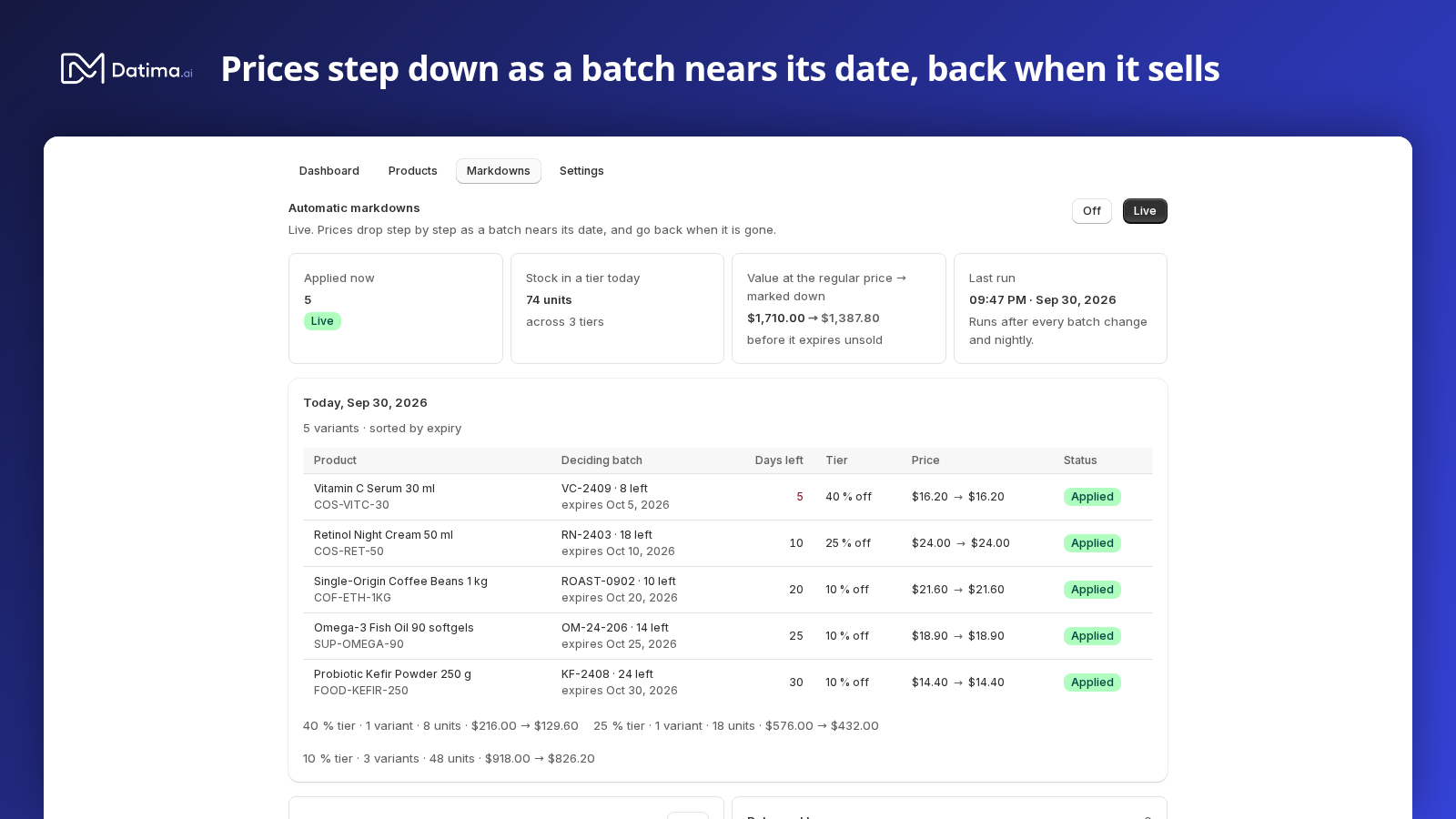
This is what Datima's markdowns do, and the reason they could be built at all is that the app already knows, per batch and per location, what is on the shelf and what every order took off it.
What the shopper sees
A lower price with no explanation reads as “something is wrong with this”. So the product page should say why. Datima's theme block, which already shows the selected variant's best-before date, adds one line while a markdown holds the price: Was $4.50 · short-dated, best before 5 Oct 2026 — or the percentage, when the product already has a compare-at price of its own, so the page never shows two different “was” prices. The compare-at field itself is left alone unless you ask for it to be filled; plenty of stores use it for their own sales, and a markdown should not pretend to be one.
Every product with a running markdown also carries a tag, datima-expiring, and loses it the moment the markdown ends. An automated collection with one condition on that tag is a Clearance page that fills and empties itself; the guide has the one-minute version.
Knowing whether it paid
A discount is a bet that the margin you give up is smaller than the write-off you avoid. The sales report cannot settle that bet, because it does not know which units sold under a markdown and which at full price. Datima does, because every sale is matched to a batch and every price change sits in a ledger. So the Markdowns tab shows, for the last 7, 30 and 90 days, how many units sold while a markdown held the price, what they brought in, and what was given up against the regular price.
One honesty note: that figure is an upper bound. Some of those units would have sold at full price anyway, and the app has no model for how many — so it is labelled sold under markdown, not saved. The weekly digest carries the same line, and a history lists every price the engine wrote and every one it stepped back from, with the batch that caused it.
What it deliberately does not do
- It does not touch variants that are already on sale (a compare-at price set) unless you tell it to.
- It does not know about Shopify Markets or price lists: the markdown is on the variant's base price, and a country with its own price list will not see it.
- It does not invent dates. A product without a recorded batch is never touched, and a product whose only remaining batch has expired goes back to full price rather than further down — what to do with expired stock is a different decision.
Turning it on
Markdowns are part of the free plan, and they are switched on per store rather than by a toggle: the card in the app opens a chat with us, we open it for your store, and the Markdowns tab is live within a minute. We do it this way on purpose. Changing prices on a live store is the one thing in the app the next sync cannot undo, and a two-minute conversation about your ladder and your compare-at habits catches the mistakes before a customer does. Once it is open, nothing changes until you switch the tab to Live yourself.
If your stock has dates and your discount bin keeps appearing a week late, install Datima, record your batches, and ask for the markdowns in the chat. The three-minute demo shows the rules, today's list, and the price going back when the batch is gone.